
AI Assistant
The AI Assistant turns a keyword or topic into a ready-made piece of SEO planning or content. Pick a template, enter your topic, and it writes the result in a few seconds. Each generation costs 1 credit.
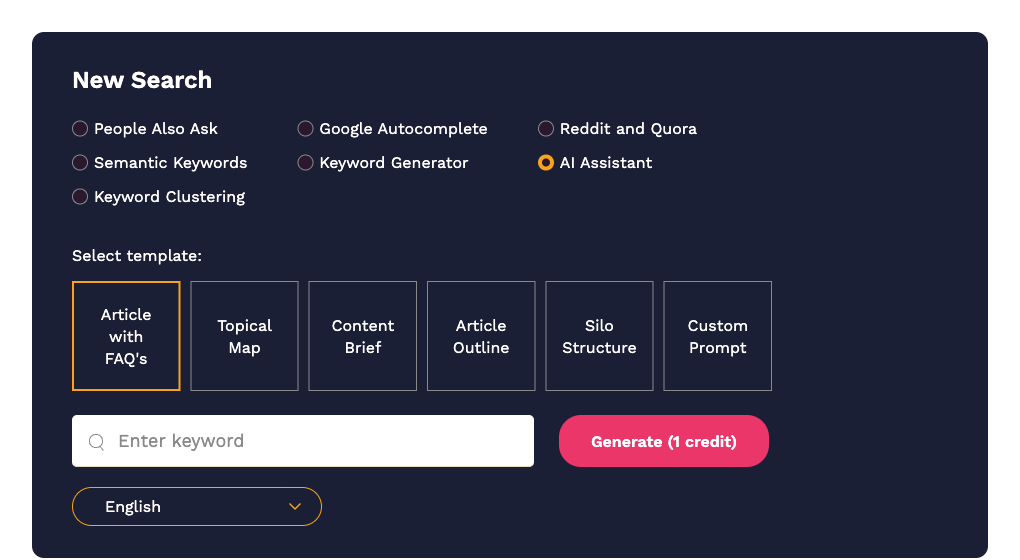
Running the assistant
- On the Dashboard select AI Assistant.
- Choose a template:
- Article with FAQ's writes a full article on the keyword with a frequently-asked-questions section at the end. The result is saved automatically under Content Tools › Articles.
- Topical Map lists the sub-topics and supporting pages you would need to cover a subject thoroughly.
- Content Brief produces a brief for a writer: target audience, angle, headings to include, questions to answer.
- Article Outline produces a heading structure for one article.
- Silo Structure suggests how to organise a site section around the topic: pillar page, supporting pages and how they link.
- Custom Prompt lets you type any instruction. The box says "Enter question or command". Use it for anything the other templates do not cover, such as rewriting a question into a title or summarising a list of keywords.
- Enter the keyword or topic. The placeholder changes depending on the template.
- Choose the language. 150 languages are available, plus English (UK) for British spelling.
- Click Generate (1 credit).
Working with the result
The result is shown as a formatted document. Use the icons above it to copy the text to your clipboard or download it as HTML or Markdown.
Everything you generate is saved in Search History under the type "AI Assistant", so you can reopen it later. Articles generated with the Article with FAQ's template also appear under Content Tools › Articles, where you can edit and tag them. See Articles and AI content generation.
Getting better output
- Be specific.
cold brew coffee ratio for beginnersproduces a sharper brief thancoffee. - Run a People Also Ask search first and paste the questions into a Custom Prompt along with your instruction, so the output is grounded in real questions.
- Treat the drafts as a starting point. Check facts and add your own expertise before publishing.
Using it from the API
POST /api/completions with a JSON body containing prompt, command and hl. See The API.