
Keyword Clustering
Keyword clustering answers the question "which of these keywords can share one page, and which need their own?". KeywordsPeopleUse clusters by looking at Google's actual results: if two keywords have several of the same pages ranking for them, Google treats them as the same topic, and they go in the same cluster. This is called SERP-based clustering and it is far more reliable than grouping by similar words.
Clustering costs 1 credit per 10 keywords, rounded up. The search-and-cluster workflows cost a flat 10 credits.
Starting a clustering job
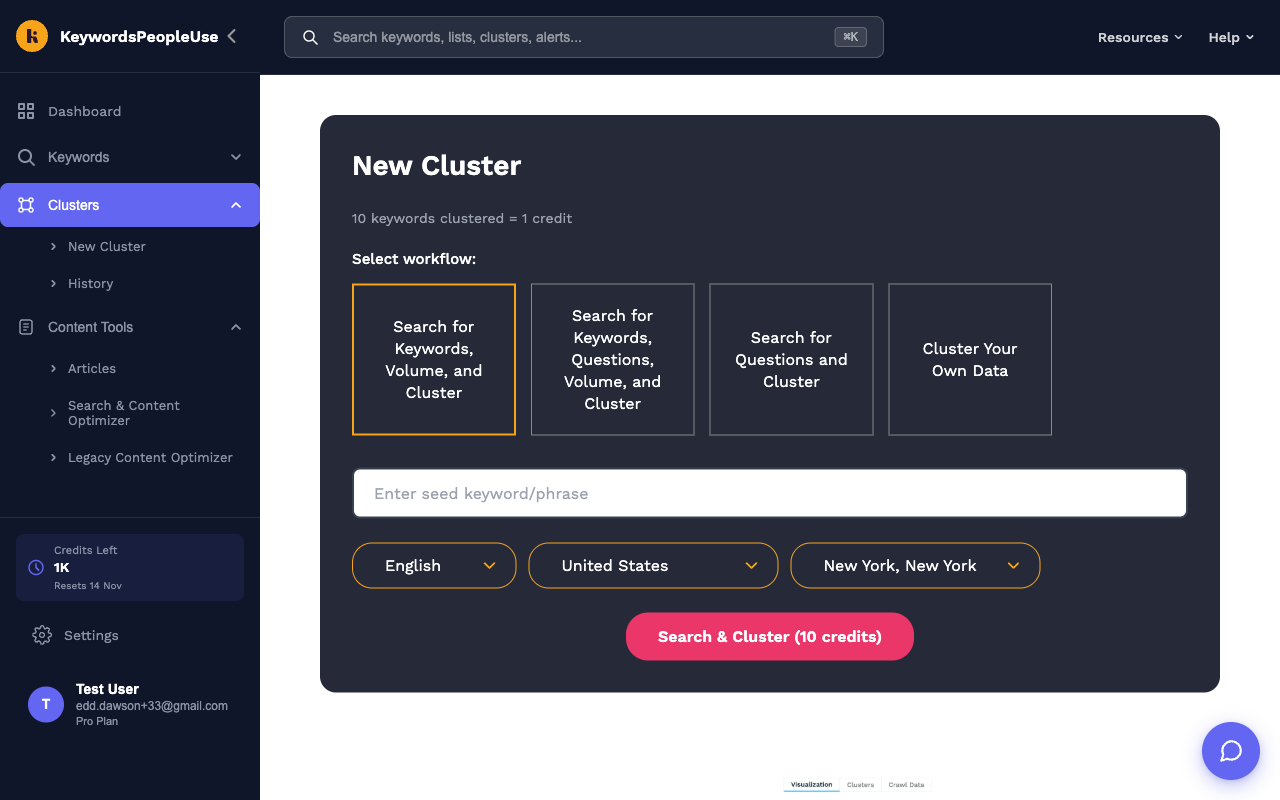
Open Clusters › New Cluster in the sidebar, or select Keyword Clustering on the Dashboard search panel. Then choose a workflow:
- Search for Keywords, Volume, and Cluster. Enter a seed keyword. We find related keywords, look up their search volumes, and cluster them. Costs 10 credits.
- Search for Keywords, Questions, Volume, and Cluster. The same, but questions from People Also Ask are added to the keyword set. Costs 10 credits.
- Search for Questions and Cluster. Enter a topic and we cluster only the questions people ask about it. Costs 10 credits.
- Cluster Your Own Data. Bring your own keywords from a spreadsheet, a rank tracker or Search Console. Costs 1 credit per 10 keywords.
Choose the language, country and city. Clustering is location-sensitive because it is based on the pages that rank in that market.
Clustering your own keywords
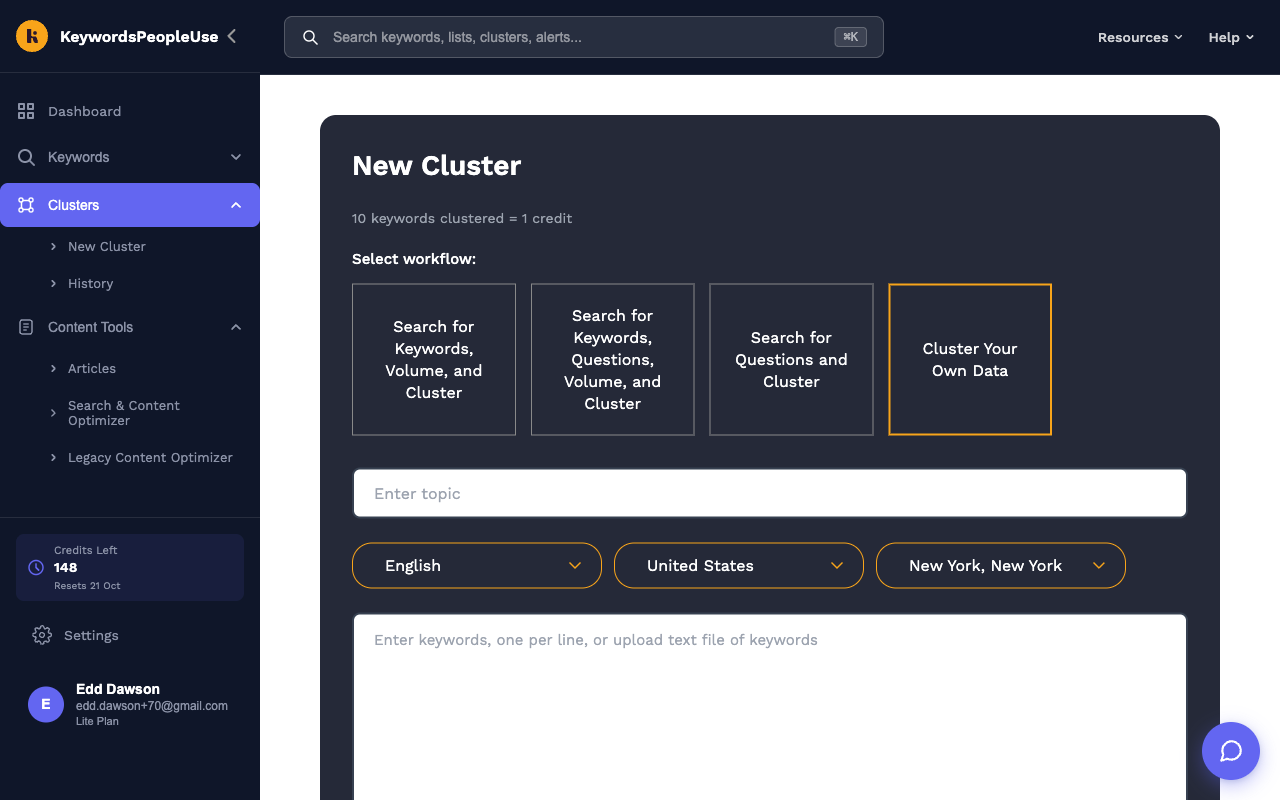
With Cluster Your Own Data selected, enter a topic name for the job, then either paste keywords into the text box, one per line, or drop a .txt or .csv file onto the upload area (up to 5 MB and 50,000 keywords). Duplicates are removed. The button shows the cost, for example Cluster Keywords (25 credits) for 250 keywords.
Clustering from a search or a list
You do not have to start from the New Cluster form:
- Every People Also Ask, Google Autocomplete and Keyword Generator result has a Keyword Clusters tab with a Cluster Keywords button.
- Every Keyword List has a Cluster Keywords button.
Both ask you to confirm the country, then create a "Your Data" clustering job.
Waiting for results
Clustering crawls Google for every keyword, so it runs in the background. Small jobs finish in a few minutes; very large ones can take a couple of hours. You can leave the site and we email you when the job is done. Progress is shown under Clusters › History, where the job reads "In Progress…" until it completes.
Reading the results
Open a finished job from Clusters › History. The top of the page shows how many keywords were clustered, how many were left unclustered, and the number of clusters. Below are three tabs:
- Visualization. A galaxy view of clusters and super-clusters. Zoom in to see the keywords in each cluster and the links to neighbouring clusters.
- Clusters. A card per cluster, headed by its main keyword with the combined search volume in brackets. Show more expands the full keyword list. The chart icon shows which domains rank across the cluster, and the graph icon shows the cluster's connections.
- Crawl Data. Every domain seen in the results, with how many unique URLs ranked, the total count, and a Topical Authority Score showing which sites Google trusts for this topic.
The Link Intersects dropdown controls how strict the clustering is: the number of shared ranking pages two keywords need before they are grouped, from 2 (loose) to 7 (very tight). Changing it re-clusters instantly without using credits.
Exporting and sharing
- Download Clusters gives a CSV with two columns, Cluster and Keyword. Keywords that did not fit any cluster are listed under "Miscellaneous".
- Share turns on a public link to the result that anyone can view. See Sharing results.
Turning clusters into content
Each cluster is a candidate page: the cluster's head keyword is the main target, the other keywords are the sub-topics and variations to cover on that page. Use the AI Assistant to write a brief or outline for each cluster, or save the clusters to Keyword Lists to hand to writers.
Limits
Unlimited-plan accounts can cluster up to 50,000 keywords a month. On other plans clustering is limited only by your credits. If you see "You don't have enough credits to proceed", reduce the keyword set, wait for your reset, or buy Pay As You Go credits.